HomeFeaturesPricingIndustriesBlogAboutContact
Sign inBook a demo
Features

Every tool a cabinet shop needs.
Nothing it doesn't.

CabiPro replaces the disconnected tools - quoting, scheduling, materials, customer comms - with one record that lives with the job.

01 - Quoting & estimating

Quote a kitchen
before lunch.

Build quotes from your last similar job - or from a parametric template. Pricing reads live from your material costs and labour rates, so what you quote is what it costs you.

  • Job templatesfor kitchens, vanities, wardrobes, fitouts.
  • Parametric pricingchange the door style, the price recalculates.
  • In-line approvalsCustomer signs by email; quote becomes a job.
  • Variation trackingfrom quote through install, with audit trail.
02 - Scheduling

One timeline.
Every job, every stage.

A live Gantt of your whole shop. Every project broken into stages - design, CNC, assembly, install - alongside supplier statements and the meetings that hold it all together. Drag a bar; everything downstream moves with it.

  • Stage-by-stage barssee exactly where each job sits this week.
  • Suppliers on the same viewPolytec, Laminex statements pinned to their due dates.
  • Meetings inlinesite measures and client reviews never get lost in a separate calendar.
  • Drag to rescheduledependencies and crew slide with the bar automatically.
03 - Materials & inventory

Sheet stock,
rack to install.

Reserve materials when the job is approved. Free them automatically if a job is delayed. Track every offcut by ID - and use them on the next job.

  • Live rack countsscanned in and out.
  • Offcut librarymatch remnants to upcoming cut lists.
  • Reorder alertstuned to your reorder point and lead time.
  • Supplier modePOs, packing slips, GRNs in the same place.
04 - Accounting

Bills and invoices,
both sides of Xero.

Connect your Xero organisation and stop entering anything twice, in either direction. Approved supplier bills push across as accounts-payable, approved client invoices push across as accounts-receivable, and payments on both mirror back onto the job.

  • Read-only dry run firstevery match and conflict is shown before anything is written.
  • Bills and invoices pushed onceexisting Xero records are adopted, never duplicated.
  • Payments mirrored backXero stays the source of truth for what suppliers and clients have actually paid.
  • Your chart of accountsexpense codes, revenue accounts and GST rates read live from Xero.
The full toolkit

Everything CabiPro
does, in one place.

Eighteen tightly-integrated modules that share a single record of your shop. Add the ones you need, leave the rest alone - it all works together out of the box.

01

User Accounts & Access Control

Control who can access your system and what they can see. Create different user roles for owners, managers, and staff, so everyone only sees what's relevant to their job.

  • Different access levels for owners, managers, and staff
  • Secure login for all users
  • Link staff profiles to login accounts
  • Automatic logout for inactive users
02

Activity History

See a clear history of everything that happens in your system. Know who updated a job, changed an order, uploaded files, or made important changes - all in one place.

  • Clear history of all changes
  • See who made each update and when
  • Easy to review mistakes or changes
  • Useful for accountability and tracking
03

Projects & Job Tracking

Manage all your projects in one place. Each project can have multiple jobs or areas, with clear progress tracking so you always know what's happening and what's next.

  • Multiple jobs under one project
  • Clear job status tracking
  • Quick overview of all active work
  • Notes and updates saved with each job
04

Clients & Contacts

Store all your client details and contacts in one place. Keep track of who to call, email, or follow up with - without digging through emails or paperwork.

  • All client details stored securely
  • Multiple contacts per client
  • Quick access when creating projects
  • No more lost phone numbers or emails
05

Production Scheduling & Job Status

See exactly what stage each job is at - design, production, finishing, or ready to install. This helps you plan workloads and avoid delays.

  • Clear job status at every stage
  • Visual production overview
  • Better planning and scheduling
  • Fewer missed deadlines
06

Staff Management

Manage your team easily. Store staff details, assign them to jobs, and see who is working on what across your projects.

  • Staff profiles with photos
  • Role and responsibility tracking
  • Assign staff to specific jobs
  • Clear visibility of workload
07

Material Selection & Specifications

Record all materials and finishes selected for each job. Keep a clear history of changes so nothing gets missed or confused during production.

  • Clear material lists for each job
  • Track changes and revisions
  • Organised by kitchen, pantry, wardrobe, etc.
  • Avoid costly material mistakes
08

Inventory Management

Keep track of all your materials and stock levels in one place. Know what you have, what you're running low on, and what needs ordering.

  • Live stock level tracking
  • Organised by material type
  • Link materials to suppliers
  • Add photos for easy identification
09

Material Usage Tracking

Track how much material is used, wasted, or added to stock. This helps reduce waste and understand real material costs.

  • Track used, added, and wasted materials
  • See material usage per job
  • Better cost control
  • Less stock loss and surprises
10

Supplier Management

Store all supplier details, documents, and contacts in one place. Easily see who you buy from and what materials they supply.

  • All supplier details in one place
  • Store invoices and documents
  • Link suppliers to materials
  • Easier supplier communication
11

Materials to Order

Plan what materials need to be ordered for each project. Track what's required, what's already ordered, and what's been used.

  • Clear material order planning
  • Avoid missing items
  • Track order progress
  • Link materials directly to jobs
12

Purchase Orders

Create and manage purchase orders easily. Track deliveries, upload invoices, and update stock automatically when materials arrive.

  • Simple purchase order creation
  • Track partial and full deliveries
  • Invoice uploads
  • Automatic stock updates
13

Supplier Statements & Payments

Keep track of supplier bills and payments. See what's due, what's paid, and manage cash flow more confidently.

  • Monthly supplier statements
  • Track paid and unpaid bills
  • Due date reminders
  • Clear financial overview
14

Documents & Drawings

Store all drawings, plans, site photos, and documents with each job. Everything is organised and easy to find when you need it.

  • Drawings and documents stored per job
  • Organised folders for easy access
  • Recover deleted files if needed
  • Secure access for authorised users
15

Workshop & Factory Overview

Get a clear picture of what's happening on your workshop floor. See active jobs, current stages, and progress at a glance.

  • Clear workshop overview
  • Track job progress visually
  • Assign work to teams
  • Reduce confusion on the floor
16

Quotes & Orders

Create professional quotes and turn them into jobs when approved. Keep everything connected from quote to production.

  • Professional quotes
  • Attach drawings and specifications
  • Quick conversion from quote to job
  • Track job from start to finish
17

Mobile App

A native app for iPhone, iPad and Android, free on the App Store and Google Play. Capture site, measurement, delivery and installation photos against the right lot, lodge expense and mileage claims, and tick off install checklists from the job.

  • Free on iOS and Android, included in your plan
  • Photos filed against the lot as you shoot
  • Expense and mileage claims from site
  • Install checklists and your assigned lots
18

Notifications & Alerts

Stay informed about important updates and deadlines. Get notified about job status changes, low stock levels, payment due dates, and other critical information that needs your attention.

  • Real-time job status updates
  • Low stock level alerts
  • Payment due date reminders
  • Customizable notification preferences
Meet Foreman Beta

Your new AI assistant
works alongside you.

Foreman reads your own stock, jobs, suppliers and clients, then answers in plain English - with a link to every record it used. Ask it anything, from any screen.

Explore Foreman in depth
01

Smart recommendations

Automatic suggestions for material usage and cut lists - minimise waste, maximise sheet yield, every job.

02

Instant answers

Ask "which jobs are due this week?" or "do we have enough white melamine?" - get accurate answers in seconds.

03

Production analytics

Advanced analysis spots bottlenecks before they become problems - optimise factory performance with data you can actually act on.

On the job site iOS & Android

The field half,
on your phone.

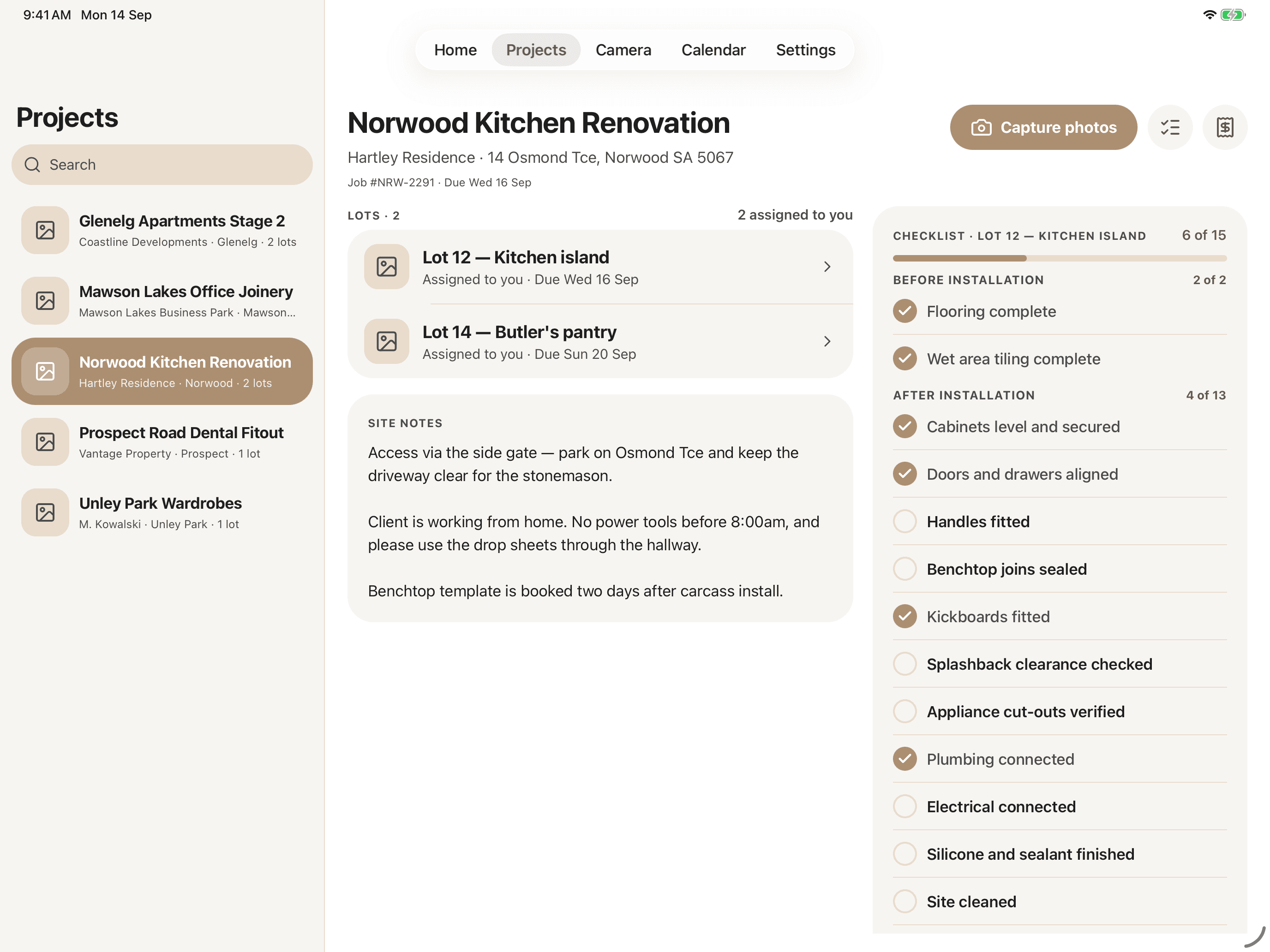
The measure up, the delivery, the install and the handover do not happen at a desk. The CabiPro app puts those parts of the job on the iPhone or Android phone already in the installer's pocket - and on the tablet a foreman runs the site from - writing straight into the same records the office works from.

  • Photos filed as you shoot themsite, measurement, delivery and install shots tagged to the right lot.
  • Claims from the drivewayphotograph the receipt, log the kilometres, let CabiPro do the maths.
  • Checklists worked on siteinstall and maintenance steps ticked off where the work happens.
CabiPro on iPad: the projects list, the Norwood Kitchen Renovation job with its assigned lots and site notes, and the install checklist, all in three columns.
CabiPro camera screen on iPhone previewing an installed kitchen island photo with a note attached, ready to submit.
Why CabiPro

Why cabinet makers
and joinery workshops
choose CabiPro.

Built by manufacturers, for manufacturers. We understand your production workflow because we've lived it.

Built for Manufacturing

Not a generic project management tool. Every feature is designed specifically for how cabinet makers, manufacturers, and joinery workshops actually work.

Get Organised Fast

Start tracking production orders and managing materials in minutes. No complex setup or training required.

Scales With You

From small cabinet shops to large joinery workshops and manufacturing facilities, CabiPro scales with your business. Add production teams and features as you grow.

See it on your last job.

A 45-minute walkthrough with a real cabinetmaker on our team.

Cookies

We use essential cookies to keep CabiPro working. Google Analytics and advertising cookies help us see how the site is used — they stay off until you say yes. Privacy policy